一、Linux文件系统常见的类型
1、ext4
- ext 系列第四代,最通⽤、最稳定。
- 多数发⾏版默认,兼容性极好。
- ⽀持⽇志、延迟分配、在线扩容、有限在线缩⼩。
- 单⽂件最⼤16TB,⽂件系统最⼤1EB。
- 适合:通⽤服务器、桌⾯、⼩⽂件较多场景。
2、xfs
- 为⾼性能、⼤容量设计。
- RHEL/CentOS7+默认。
- ⼤⽂件顺序读写、⾼并发I/O强。
- ⽀持在线扩容,不⽀持缩⼩。
- 适合:数据库、虚拟化、媒体存储、⼤⽂件、⾼并发。
二、inode与block
磁盘管理流程:
磁盘分区(fdisk/parted)
    ↓
只是一个空的分区(还没有文件系统结构)
    ↓
格式化(mkfs.ext4 / mkfs.xfs)
    ↓
此时才创建:超级块、inode 表、block 位图、根目录
1、什么是block
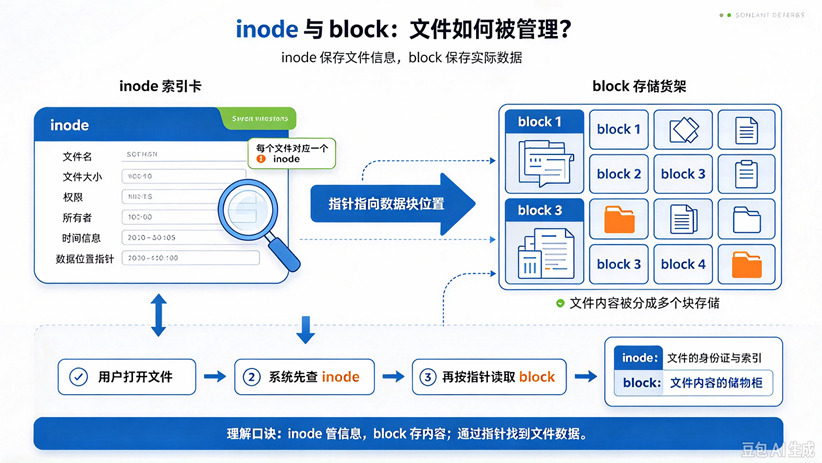
⽂件储存在硬盘上,硬盘的最⼩存储单位叫作"扇区"(Sector)。每⼀个扇区储存512字节(⾄关于0.5KB)。
操作系统读取硬盘的时候,不会⼀个个扇区地读取,这样效率过低,⽽是⼀次性连续读取多个扇区,
即⼀次性读取⼀个"块"(block)。这种由多个扇区组成的"块",是⽂件系统存取的最⼩单位。"块"的
⼤⼩,最多⻅的是4KB,即连续⼋个sector组成⼀个block。
2、什么是inode
inode(indexnode,索引节点)是Linux⽂件系统中⽤于存储⽂件元数据的数据结构,每个⽂件或⽬录都有唯⼀的⼀个inode。
inode包含:
- 文件类型(普通文件、目录、符号链接等)
- 权限(rwx)
- 所有者UID、组GID
- 文件大小
- 时间戳:创建/修改/访问时间(ctime、mtime、atime)
- 链接数(硬链接计数)
- 指向数据块的指针(直接指针、间接指针、多级间接指针)
- 文件系统相关标志、扩展属性等
3、inode与block的协作关系
inode与block的常用命令
[root@localhost /]# df -h     #先看空间
[root@localhost /]# df -i      #再看inode
[root@localhost /]# -sh /*     #看哪个目录占空间大
[root@localhost /]# du --inodes -s /* | sort -nr | head     #看哪个目录占 inode 多
三、文件软硬链接
1、什么是链接
Linux中,链接(link)是指将⼀个⽂件与另⼀个⽂件或⽬录名关联起来的操作。
Linux中有两种类型的链接:
- 硬链接(hardlink)
- 软链接(symboliclink)
2、什么是软/硬链接
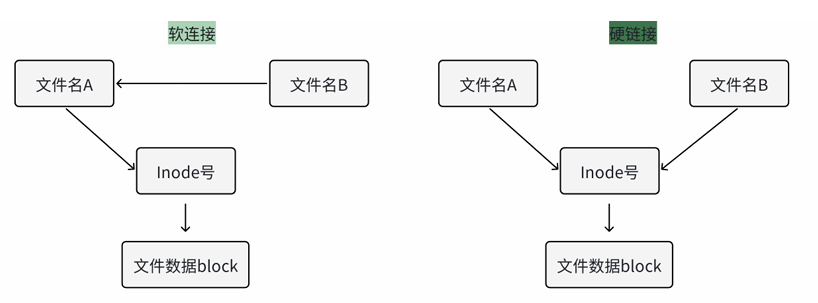
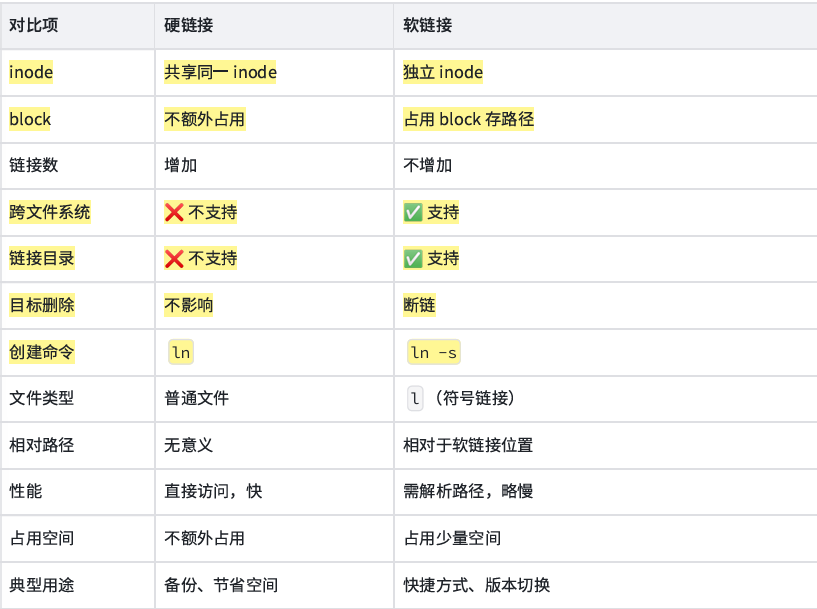
硬链接是多个文件名指向同⼀个inode的链接⽅式。
软链接指的是将⼀个⽂件名称指向另⼀个⽂件名称,类似与windows的快捷⽅式。
3、软/硬链接的特点与限制
4、创建与管理软硬链接
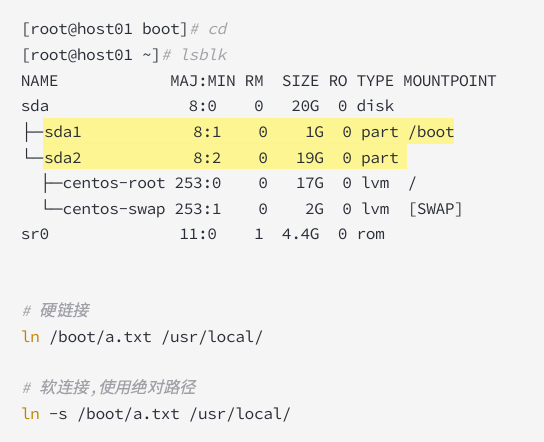
sda1 和sda2属于两个不同的分区,也属于两个不同的⽂件管理系统。
四、文件查找与过滤
1、find命令:find 是Linux下最强⼤的⽂件查找⼯具,实时遍历⽬录树,⽀持按名称、类型、⼤⼩、时间、权限、属主等条件查找,还能对结果执⾏动作。
语法:
[root@localhost /]# find [搜索路径] [条件] [动作]示例:
# 按名称查找:
find /etc -name "*.conf"       # 精确匹配文件名,区分大小写
find /etc -iname "*.conf"      # 忽略大小写

# 按类型查找:
find /var -type f              # 普通文件
find /var -type d              # 目录
find /var -type l              # 符号链接

# 按大小查找:
find / -size +100M             # 大于 100M
find / -size -1k               # 小于 1KB
find / -size 0                 # 空文件

# 按时间查找:
find /var/log -mtime -7        # 7 天内修改过
find /var/log -mtime +30       # 30 天前修改过
find /var/log -mmin -30        # 30 分钟内修改过
find /var/log -atime +30       # 30 天前访问过

# 按权限和属主:
find / -perm 777               # 权限正好是 777
find / -perm -4000             # 含 SUID 位
find / -user nginx             # 属主是 nginx
find / -group docker           # 属组是 docker
find / -nouser -o -nogroup     # 无属主或无属组

# 组合条件:
find /var -type f -name "*.tmp" -size +10M
find / -type f \( -name "*.conf" -o -name "*.cnf" \)   # 批量匹配多个文件名
find / -type f ! -name "*.txt"                         # 排除特定类型

# 对结果执行动作:
find /tmp -type f -name "*.tmp" -delete                # 删除
find /tmp -type f -name "*.log" -exec rm -f {} \;      # 逐个执行
find /tmp -type f -name "*.log" -exec rm -f {} +       # 批量执行,效率更高
find / -type f -name "*.conf" -printf %p@ | xargs -0 ls -l # 处理含空格文件名- find 是实时遍历,目录大时慢,但结果准确。
- -exec ... \; 每个文件启动一次进程,慢;-exec ... + 批量传参,快。
- 处理含空格/特殊字符文件名,用 -print0 + xargs -0。
2、locate命令:locate 不是实时查找,而是查一个预建好的数据库,所以速度极快,但结果可能不是最新。 数据库一般位于 /var/lib/mlocate/mlocate.db 或 /var/lib/locatedb 。
优缺点:
- 优点:极快,适合快速定位文件。
- 缺点:结果可能滞后;新建文件可能查不到;默认可能不索引某些目录(如 /tmp、外部挂载点,取决于配置)。
基本⽤法:
# 需要安装命令
yum install -y mlocate

# 手动更新数据库
updatedb

# 查找
locate nginx.conf
locate -i README              # 忽略大小写
locate -n 10 "*.conf"         # 只显示前 10 条
locate -c "*.log"             # 只统计数量
locate -r "\.conf$"           # 正则匹配
3、which、type
which:查询命令的绝对路径
which ls
which systemctl
type:查命令到底是什么类型
type ls
type cd
type -a ls              # 显示所有可能
type -t ls              # 只输出类型:alias/builtin/file/function/keyword
输出可能是:
- alias : 别名
- builtin : shell 内置命令,如 cd、echo
- file : 外部可执行文件
- function : shell 函数
- keyword : shell 关键字,如 if、for
4、grep内容过滤
grep是按内容过滤的工具,和find按文件属性查找互补。
基本用法:
grep "error" /var/log/messages
grep -i "error" file.log              # 忽略大小写
grep -r "error" /var/log/             # 递归目录
grep -n "error" file.log              # 显示行号
grep -v "error" file.log              # 反向匹配,排除
grep -c "error" file.log              # 统计匹配行数
grep -l "error" *.log                 # 只显示匹配的文件名
grep -L "error" *.log                 # 显示不匹配的文件名
常用选项:
grep -w "root" file       # 全词匹配
grep -x "root" file       # 整行匹配
grep -A 3 "error" file    # 显示匹配行及后 3 行
grep -B 3 "error" file    # 显示匹配行及前 3 行
grep -C 3 "error" file    # 前后各 3 行
grep -E "error|fail" file # 扩展正则
grep -F "a.b" file        # 固定字符串,不解释正则
grep -o "error" file      # 只输出匹配部分
递归和⽂件过滤:
grep -r "error" /var/log/
grep -r --include="*.log" "error" /var/log/
grep -r --exclude="*.tmp" "error" /data/
grep -r --exclude-dir=".git" "error" /project/
和find配合:
find /var/log -type f -name "*.log" -exec grep -l "error" {} +
find /data -type f -name "*.conf" | xargs grep -n "listen"
和管道配合:
ps aux | grep nginx
ps aux | grep -v grep | grep nginx      # 排除 grep 自身
cat file.log | grep -i error | wc -l